Ever wanted to backseat game your friends in League of Legends without actually queuing up? Or maybe you're a coach looking to review a student's gameplay? The league spectate feature lets you do just that, allowing you to observe matches in real-time and analyze every decision (or misplay!). This guide covers everything you need to know about spectating in League, from getting started to advanced tips and troubleshooting.
At a glance:
- You can spectate friends' games directly through the client.
- Spectating provides a comprehensive view of the match, including stats, items, and cooldowns.
- Spectator mode has a delay to prevent cheating in ranked games.
- Custom games allow for zero-delay spectating, perfect for coaching.
- There are several customizable settings and hotkeys to enhance your viewing experience.
Why Spectate? The Benefits of Being a League Observer
Spectating isn't just for the idle curious; it's a powerful tool for improvement, entertainment, and community engagement. Here's why you might want to jump into spectator mode:
- Learn from Others: Observing higher-elo players can provide valuable insights into strategies, mechanics, and decision-making. You can see how they handle different matchups, manage the jungle, and coordinate with their team.
- Coach Your Friends: Spectate your friends' games to identify areas where they can improve. You can offer real-time feedback or review the replay later to provide more detailed analysis.
- Enjoy the Game from a Different Perspective: Sometimes, you just want to relax and watch a game without the pressure of performing. Spectating offers a chill way to experience League of Legends.
- Scout Opponents (Custom Games): If you're playing in a tournament or organized event, spectating can be used (with permission, of course!) to scout your opponents and identify their tendencies.
- Create Content: Content creators use spectate mode extensively to create educational videos, highlight reels, and entertaining commentary.
Getting Started: How to Watch a Friend's Game
Watching a friend's game in League of Legends is incredibly straightforward. Here's the simple step-by-step:
- Open the League Client: Launch the League of Legends client and log in.
- Find Your Friend: Locate the friend you want to spectate in your friend list on the right-hand side of the client.
- Right-Click and Spectate: Right-click on your friend's name. If they are in a game, you'll see a "Spectate" option. Click it.
- Enjoy the Show: The game will load, and you'll be placed into spectator mode with a built-in delay.
That's it! You're now watching your friend's game. Let's dive into what you can do while spectating.
Understanding the Spectator Interface: Your Window into the Game
The spectator interface is packed with information and controls to enhance your viewing experience. Here's a breakdown of the key elements:
- Top Bar: This displays team scores (kills, gold, towers destroyed), champion names, and summoner names.
- Side Panels: These panels show detailed information about each champion, including their items, stats, abilities, and cooldowns. You can toggle between different players to see their individual builds and progress.
- Bottom Bar: This bar provides controls for pausing, rewinding, fast-forwarding, and adjusting the camera view.
- Timeline: This shows the game's progress, allowing you to jump to specific moments in the match. Keep in mind you can only rewind to a maximum of 5 minutes.
- Team Fight UI: Pressing 'A' toggles a team fight-centric UI, designed to provide a clear view of the action during chaotic team engagements.
Mastering Spectator Controls: Camera, Speed, and Information
Spectating is more than just watching; it's about controlling what you see and how you see it. Here’s how to maximize your control:
- Camera Control:
- Directed Camera: Automatically follows the action, switching between key moments and team fights.
- Manual Camera: Allows you to freely pan and zoom around the map.
- Champion Lock: Locks the camera onto a specific champion, following their every move. You can cycle through champions using hotkeys.
- Playback Speed: Adjust the playback speed from 0.25x to 8x, allowing you to analyze crucial moments in detail or quickly skip through less interesting parts of the game.
- Time Jumping: Use the timeline to jump to specific moments in the game. The 15-second rewind button is perfect for rewatching key plays.
- Fog of War Toggle: While spectating, you can see either team's vision. This feature is extremely helpful for learning how vision control impacts the game. However, be warned that the Fog of War cannot be controlled when spectating matchmade games.
- Zoom Control: By pressing Ctrl+Shift+Z, you can unlock zoom to fine-tune how close or far away you are from the action.
Experiment with these controls to find the settings that best suit your needs.
Custom Games: Zero-Delay Spectating and Advanced Features
Custom games offer a unique spectating experience with several advantages:
- Zero-Delay Spectating: The host can disable the spectator delay, allowing for real-time observation. This is ideal for coaching, scrims, and content creation where immediate feedback is crucial.
- Increased Flexibility: Custom games allow for more experimentation with different settings and strategies without affecting your ranked rating.
- Limited Spectators: The maximum number of spectators is 4 for custom games.
To host a custom game and disable the delay:
- Create a custom game in the League client.
- In the game settings, find the option to disable the spectator delay.
Configuration Tweaks: Unlocking Hidden Potential
League of Legends allows for some configuration tweaks that can enhance the spectator experience. These edits are at your own risk and Riot Games doesn't officially support them, so proceed with caution.
- Unlocked Zoom: As mentioned, Ctrl+Shift+Z unlocks the zoom on the spectator camera natively.
- eSports Neutral Timers: To enable the neutral monster timers that are used in Esports broadcasts, add the line "[Spectator] eSportsNeutralTimers=1" to your game.cfg file located in the Config folder (C:\Riot Games\League of Legends\Config). This will display timers for Dragon and Baron, making it easier to track objective control.
Troubleshooting: What to Do When Spectator Mode Goes Wrong
Sometimes, the spectator mode can encounter issues. Here are some common problems and their solutions:
- Stuck in Spectator Mode: If you get stuck in spectator mode and can't exit, try these steps:
- Minimize the League client.
- Go to the LoL configuration folder (C:\Riot Games\League of Legends\Config).
- Delete "LeagueClientSettings.yaml".
- Restart the client.
- If that doesn't work, try unchecking "Close client during game" and "Enable Low Spec Mode" in the client settings (Client/General).
- As a last resort, wipe all config files by deleting everything in C:\Riot Games\League of Legends\Config and restart the client.
- If all else fails, reinstall the client using the Hextech Repair Tool.
Report any persistent issues to Riot Support.
The Delay Dilemma: Why Is There a Spectator Delay?
You might be wondering why there's a delay when you spectate a game Watch League of Legends games live. The spectator delay is in place to prevent cheating, specifically "ghosting." Ghosting involves spectators communicating information about the enemy team's movements and strategies to the players in the game, giving them an unfair advantage.
- Ranked Games: Summoner's Rift has a 180-second (3-minute) delay to prevent ghosting.
- ARAM Games: Howling Abyss has a 60-second (1-minute) delay to prevent ghosting.
- Custom Games: The host can disable the delay for legitimate purposes like coaching or content creation.
League Spectate and Esports: Watching the Pros
Spectating isn't just about watching your friends; it's also about watching the best players in the world compete at the highest level. League of Legends Esports events are a major draw, and spectator mode plays a crucial role in their broadcast.
- Official Broadcasts: Official broadcasts use a customized spectator mode with minimal production delay. Riot Games manages the delay to ensure fairness and competitive integrity Watch League Esports Live.
- Expert Commentary: Professional casters provide commentary and analysis, enhancing the viewing experience and providing insights into the game.
Third-Party Spectating Resources
While the in-client spectate feature is the primary way to watch games, several third-party resources exist that can also be helpful:
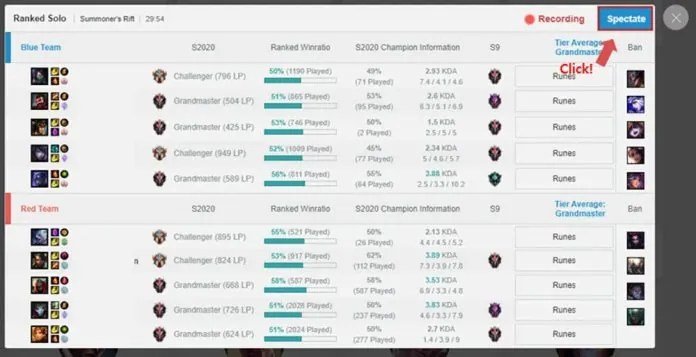
- OP.GG: This website provides detailed match history information, including the option to spectate live games.
Beyond the Basics: Advanced Spectating Tips
Ready to take your spectating game to the next level? Here are some advanced tips:
- Focus on Specific Roles: Instead of trying to watch everything at once, focus on a specific role (e.g., jungle, mid lane) to learn their macro and micro decision-making.
- Analyze Item Builds: Pay close attention to the items that players are building and why. This can provide insights into itemization strategies for different matchups.
- Track Cooldowns: Keep an eye on key ability cooldowns, like ultimates and summoner spells. This can help you understand when players are vulnerable and when they have the advantage.
- Study Vision Control: Vision is crucial in League of Legends. Watch how players use wards to control vision and deny information to the enemy team.
- Review Replays: Download replays of your own games to analyze your mistakes and identify areas for improvement.
Answering Your Questions About League Spectate
Q: Can I spectate a game if my friend is in a normal game?
A: Yes, you can spectate any game your friend is in, whether it's a normal game, ranked game, or ARAM.
Q: Can the person I'm spectating see that I'm watching them?
A: No, the player you are spectating will not receive a notification that you are watching their game.
Q: How many people can spectate a custom game?
A: A maximum of four spectators can be in a custom game.
Q: Is there a way to spectate without any delay?
A: Yes, in custom games, the host can disable the spectator delay, enabling zero-delay spectating.
Q: Can I spectate professional players in their solo queue games?
A: While you can't directly spectate a specific pro player's solo queue game through the client unless they are on your friend list, you can sometimes find their games on third-party websites like OP.GG and watch them from there Watch League Games Live.
Ready Player Observer: Putting Your Spectating Skills to Work
Now that you're armed with the knowledge and tools to become a skilled League of Legends spectator, it's time to put your skills to the test. Whether you're looking to learn from the pros, coach your friends, or simply enjoy the game from a different perspective, spectator mode offers a unique and valuable experience. So, jump into the client, find a game to watch, and start analyzing! You might be surprised at what you discover.